Twilee can send you periodic email reports summarizing your QR code scan activity. Reports are configured at the team level and sent to all team members.
Setup
Go to QR Codes > Reports from the management menu. Toggle any combination of the three report frequencies:
| Frequency | Content |
|---|---|
| Daily | Scan summary for the previous day |
| Weekly | Scan summary for the previous 7 days |
| Monthly | Scan summary for the previous 30 days |
You can also control whether reports are sent when there is no scan activity. By default, reports are always sent. Uncheck Send reports even when there are no scans to skip reports for periods with zero scans.
Changes take effect immediately.
What you receive
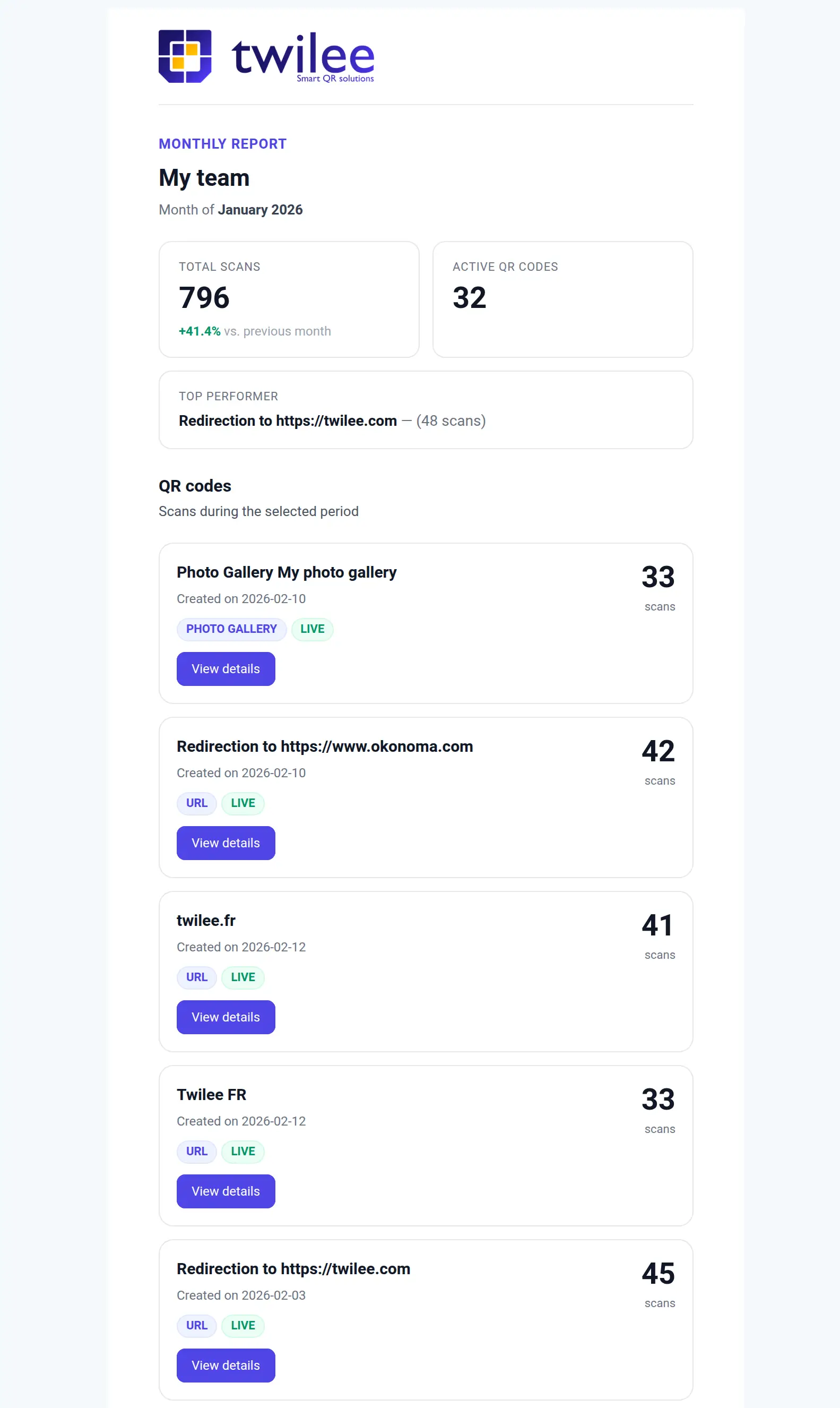
Each email report includes:
- Total scans for the period, with a percentage change compared to the previous period (e.g., vs. previous week for weekly reports).
- Active QR codes count, showing how many of your QR codes are currently live.
- Top performer, the QR code that received the most scans during the period (hidden when there are no scans).
- QR code breakdown: a list of every QR code that was scanned, with its type, status (Live or Offline), and scan count. QR codes with no scans are not listed individually but a summary count is shown at the bottom.
Each email also includes a link to manage your report settings directly.
Good to know
- Reports are sent to all team members automatically.
- You can enable multiple frequencies at the same time (e.g., daily and monthly).
Available on: All plans.