
New QR Code Type: Audio
We're excited to introduce a new QR Code type on Twilee — Audio QR Codes.
This feature allows you to share audio content instantly through a single scan or link. Whether it's a podcast episode, music track, voice message, or audio guide, Audio QR Codes provide a seamless listening experience on any device.
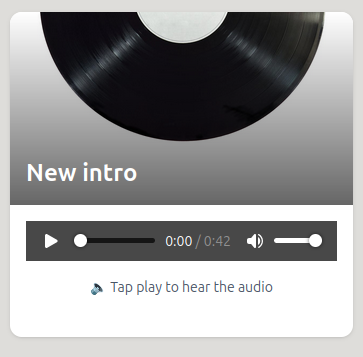
What Are Audio QR Codes?
An Audio QR Code displays your audio content on a beautiful, mobile-friendly hosted page with a built-in player. When someone scans your code or clicks your link, they're instantly taken to a page where they can:
- Play and pause your audio
- See track progress with a visual timeline
- View your audio title and description
- Read additional context or show notes
- Access related links or resources
The audio player is clean, fast, and works perfectly on all devices — no app downloads or special software required.
Who Are Audio QR Codes For?
Podcasters & Content Creators
Share episodes, bonus content, behind-the-scenes clips, and exclusive teasers with your listeners. Add Audio QR codes to:
- Podcast artwork and promotional materials
- Social media graphics and posts
- Email newsletters and show notes
- Merchandise and branded items
- Event materials and conference badges
Musicians & Artists
Distribute your music directly to fans without requiring streaming platform accounts:
- Share singles, EPs, or album previews
- Provide exclusive tracks or acoustic versions
- Include artist commentary or stories behind the songs
- Add to physical merchandise, posters, or album artwork
- Create limited-edition releases with unique QR codes
Tour Guides & Museums
Create engaging audio experiences for visitors:
- Museum exhibit audio descriptions
- Historical site narrations and stories
- Self-guided walking tour commentary
- Art gallery insights and artist interviews
- Educational content for schools and institutions
Business & Marketing
Use audio to connect with customers in unique ways:
- Product demonstrations and tutorials
- Customer testimonials and success stories
- Brand stories and company history
- Audio business cards with personal introductions
- Training materials and onboarding content
Educators & Trainers
Enhance learning with audio content:
- Lecture recordings and supplementary material
- Language learning pronunciation guides
- Audio textbook companions
- Meditation and mindfulness exercises
- Audiobook chapters and study guides
Personal Use
Share meaningful audio moments:
- Voice messages for loved ones
- Recorded greetings and celebrations
- Family stories and oral histories
- Travel audio journals
- Custom playlists with personal introductions
Key Features
Built-in Audio Player
- Intuitive play/pause controls
- Progress bar with time tracking
- Volume control
- Mobile-optimized interface
Rich Content Display
- Audio title and description
- Full rich text formatting for show notes
- Custom top image or artwork
- Creator or artist information
- Related links and calls-to-action
Fully Customizable
- Choose bordered or borderless template styles
- Customize colors to match your brand
- Add cover art or promotional images
- Format descriptions with rich text
- Include multiple links and resources
Dynamic Updates
- Replace audio files anytime without changing the QR code
- Update descriptions and show notes as needed
- Modify links and resources on the fly
- Track engagement through analytics
Two Ways to Share
Every Audio QR Code comes with both a QR code and a shareable link:
Share via QR Code
- Print on physical materials, flyers, or posters
- Display on screens, presentations, or digital signage
- Add to product packaging or merchandise
- Include on business cards or promotional items
Share via Direct Link
- Post on social media platforms
- Send in emails or messaging apps
- Embed in your website or blog
- Add to email signatures or bios
Same audio content, multiple distribution methods.
How to Create an Audio QR Code
Creating one takes less than a minute:
- Log in to Twilee at twilee.com/login
- Click "Create New QR Code" and select "Audio"
- Upload your audio file (MP3, WAV, or other supported formats)
- Add your details — title, description, and any additional context
- Customize the design — colors, template style, and cover image
- Download your QR code and get your shareable link
- Share however you want — print, post, or send
It's that simple.
Why Choose Audio QR Codes?
No Platform Required
- No need for Spotify, Apple Podcasts, or other platforms
- Direct distribution to your audience
- Complete control over your content
- No algorithms determining who sees your work
Professional Presentation
- Beautiful, distraction-free listening experience
- Mobile-optimized player interface
- Custom branding and appearance
- Ad-free environment for your listeners
Flexible Distribution
- Works with both QR codes and direct links
- Share on physical and digital channels
- Update content without reprinting materials
- Track engagement and listener behavior
Easy Updates
- Replace audio files anytime
- Update descriptions and show notes
- Change links and resources
- All without creating a new QR code
Use Cases at a Glance
- 🎙️ Podcasts — Episodes, teasers, bonus content
- 🎵 Music — Singles, albums, demos, exclusive tracks
- 🏛️ Tours — Museum guides, historical narrations, walking tours
- 💼 Business — Testimonials, demos, audio business cards
- 📚 Education — Lectures, language learning, audiobooks
- ❤️ Personal — Voice messages, stories, greetings
Coming Soon
We're continuously improving Audio QR Codes with new features:
- Playlist support for multiple tracks
- Chapter markers for long-form content
- Download options for offline listening
- Advanced analytics and engagement metrics
- Integration with podcast platforms
- Audio waveform visualization
Want to influence our roadmap? Share your feature requests through the Twilee dashboard.
Get Started Today
Audio QR Codes make sharing audio content effortless. Whether you're a podcaster reaching your audience, a musician sharing your art, or anyone with audio worth sharing, Twilee gives you the tools to do it beautifully.
Create once. Share everywhere. Update anytime.
👉 Log in to your Twilee dashboard and create your first Audio QR Code today.
Learn more about Audio QR Codes at twilee.com/features/hosting/audio.
Share your sound. Amplify your message. All with one smart QR code.