Real-time QR code tracking and analytics
Track QR code scans in real time, see when, where and how often
Monitor every scan with detailed QR code analytics. Know exactly when people engage with your QR codes, where they are scanning from, and which devices they use. No technical setup. No waiting for reports.
- Real-time QR code tracking for every campaign,
- capturing each scan as it happens and surfacing it in your dashboard within seconds. Track QR codes across print ads, packaging, events, and digital channels from a single view, and watch campaign trends emerge as scans roll in.
- Geographic insights that reveal where scans come from,
- with country and city data on every scan. Identify the markets that drive the most engagement and tailor your campaigns to the regions that matter most.
- Device and browser analytics for every scan,
- showing whether your audience scans from iOS, Android, desktop, or other platforms. Optimize your landing pages and hosted content for the devices your visitors actually use.
No credit card required. Start free, upgrade when you need more.
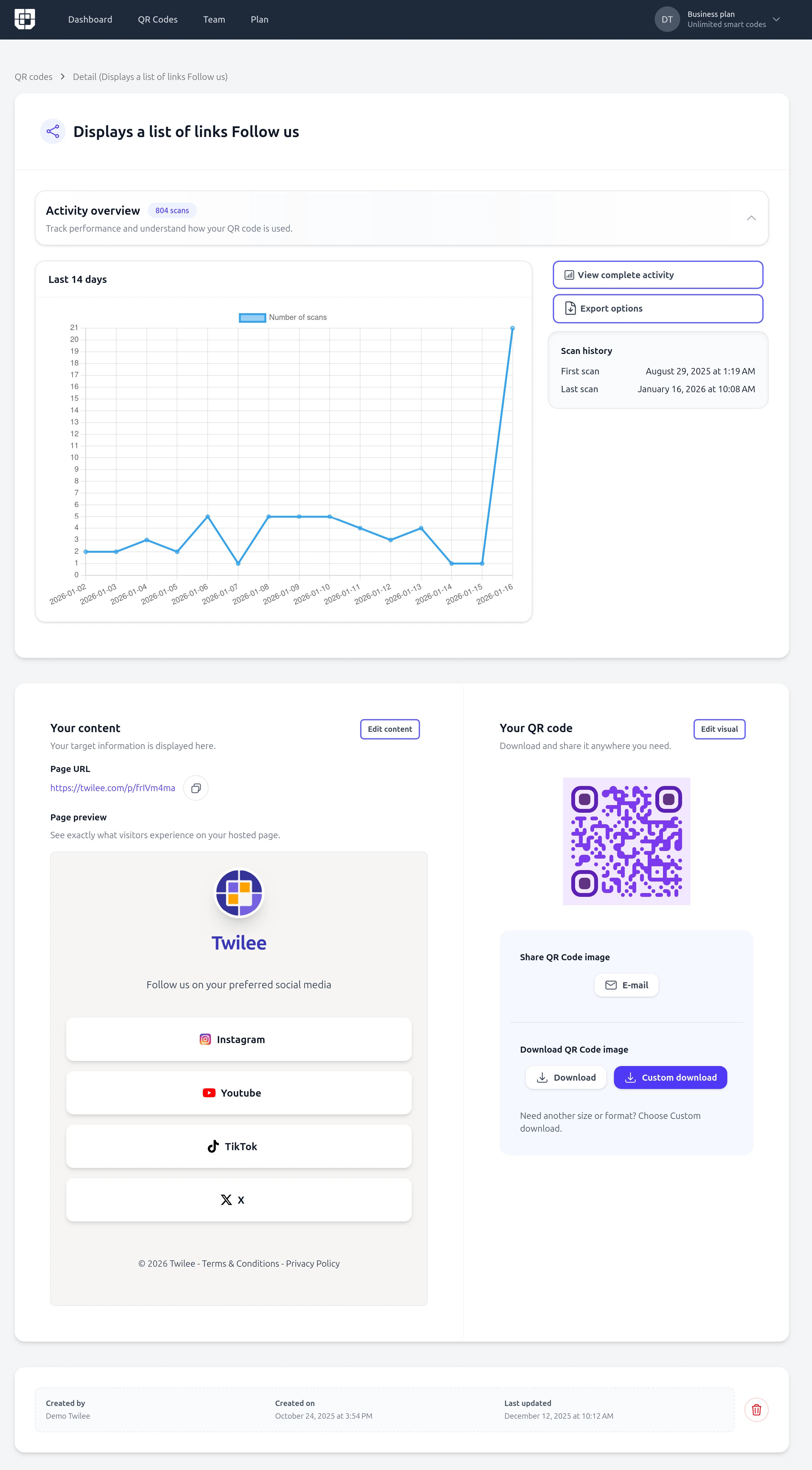
How QR code tracking works with Twilee
With Twilee, tracking QR codes is simple. Every time someone scans your QR code, our system captures data about that scan and pushes it to your dashboard within seconds. You get instant insights into QR code performance with no technical setup.
- 1 Create a QR code with Twilee.
- 2 Share it on marketing materials, products, packaging, or digital channels.
- 3 Every scan is tracked automatically through our redirect service.
- 4 View up-to-date analytics in your dashboard within seconds.
- 5 Optimize your campaigns based on real performance data.
That is it. Start tracking QR code scans in seconds. Twilee is built on dynamic QR codes, which is how every scan gets routed through our service and reported back to you.
What you can track with QR code analytics
Your QR code tracking dashboard gives you clear visibility into every scan:
- Total scans: how many times each QR code has been scanned.
- Scan location: track QR code scans by country and city.
- Device type: see whether scans come from mobile, tablet, or desktop.
- Operating system: identify iOS, Android, Windows, macOS, and more.
- Browser: know which browsers your audience uses.
- Scan date and time: see exactly when each scan happens.
- Scan frequency: identify peak scanning windows and traffic patterns over time.
All tracking data updates within seconds of a scan. No delays. No complicated reports.
Your real-time QR code tracking dashboard
Your Twilee dashboard shows all your QR code tracking data in one place. Scan data appears within seconds, so you can keep an eye on active campaigns and drill into the metrics that matter most.
- Country breakdown: visualize top scan locations with clear charts.
- Device and OS breakdown: understand the platforms behind every scan.
- Scan frequency timeline: spot peak windows and traffic patterns over time.
- Per QR code activity: drill into the statistics of any individual QR code.
- CSV and XLSX export: download scan data for reporting, sharing, or further analysis.
Send every QR code scan to Google Analytics 4
Twilee can forward every QR code scan directly to your Google Analytics 4 property via the GA4 Measurement Protocol. See QR code scans alongside your other marketing channels in a single GA4 view, with automatic geographic data, traffic attribution (source: twilee, medium: qr_code), and QR code metadata attached to every event.
Configure your GA4 Measurement ID and API secret in your team settings, and Twilee takes care of the rest. Every new scan triggers a GA4 event ready for analysis.
Google Analytics 4 forwarding is available from the Premium plan.
Why track QR codes? Real-world use cases
QR code tracking helps you measure what matters. Businesses of every size use Twilee to drive results across many scenarios:
Marketing campaigns
Track QR codes on print ads, billboards, flyers, and social media. See which campaigns drive the most engagement and adjust your strategy based on real scan data.
Event check-ins
Use QR codes at events to track arrivals. Know how many attendees showed up, when they arrived, and which session entrances were busiest.
Product launches
Monitor how many customers scan the QR code on your product or packaging. Measure interest in real time and adjust marketing or inventory based on demand signals.
Packaging and retail
Track QR codes on packaging, receipts, and in-store displays. Understand how shoppers interact with your brand long after they leave the store.
Asset and inventory tracking
Track QR codes on equipment, inventory, or tools. Know when and where assets are scanned for better logistics, maintenance, and management.
Free QR code tracking, no credit card required
Start tracking QR codes for free today. Twilee gives you access to the full analytics dashboard, location and device insights, and no credit card at signup. Upgrade when you need longer scan retention, data export, Google Analytics 4 forwarding, or API access. See all Twilee plans and features.
Frequently asked questions
Common questions about QR code tracking and analytics.
What data is tracked when someone scans my QR code? ▼
Each scan records the timestamp, approximate geographic location (city and country), device type, operating system, and browser. All data is collected in compliance with GDPR and privacy regulations.
Can I track scans on static QR codes? ▼
No. Scan tracking requires dynamic QR codes, which route through our servers before redirecting. Static QR codes encode data directly and bypass our servers entirely, so no analytics are possible.
Is the tracking data available in real time? ▼
Yes. Scan data appears in your dashboard within seconds of each scan, so you can monitor campaigns as they happen and export reports at any time.
Is QR code tracking free? ▼
Yes. Twilee lets you start tracking QR codes for free, with access to the full analytics dashboard and no credit card required at signup. Upgrade when you need longer retention, data export, Google Analytics 4 forwarding, or API access.
Can I track QR codes I created elsewhere? ▼
No. To track QR code scans with Twilee, the QR code must be created on Twilee. Dynamic QR codes route through our redirect service, which is how scan data is captured and reported.
Can I export my analytics data? ▼
Yes. You can export scan logs and analytics reports as CSV or XLSX from your dashboard, making it easy to share results with your team or pull the data into external reporting tools. Data export is available from the Premium plan.
How long is my scan tracking data kept? ▼
Scan history is retained for the duration of your plan. Higher plans include longer retention windows, so upgrade if you need to analyze long-term trends and historical campaign performance.
How does the Google Analytics 4 integration work? ▼
When enabled, each QR code scan sends an event to your GA4 property via the Measurement Protocol. The event includes QR code metadata, geographic location, and traffic attribution (source: twilee, medium: qr_code). You configure your GA4 Measurement ID and API secret in the team settings. This feature is available from the Premium plan.