Keep your QR codes organized
Organize with Tags
Tags help you categorize and organize your QR codes for easy filtering, searching, and bulk operations. Create custom tags with colors to match your workflow and keep your campaigns structured.
Tag Management
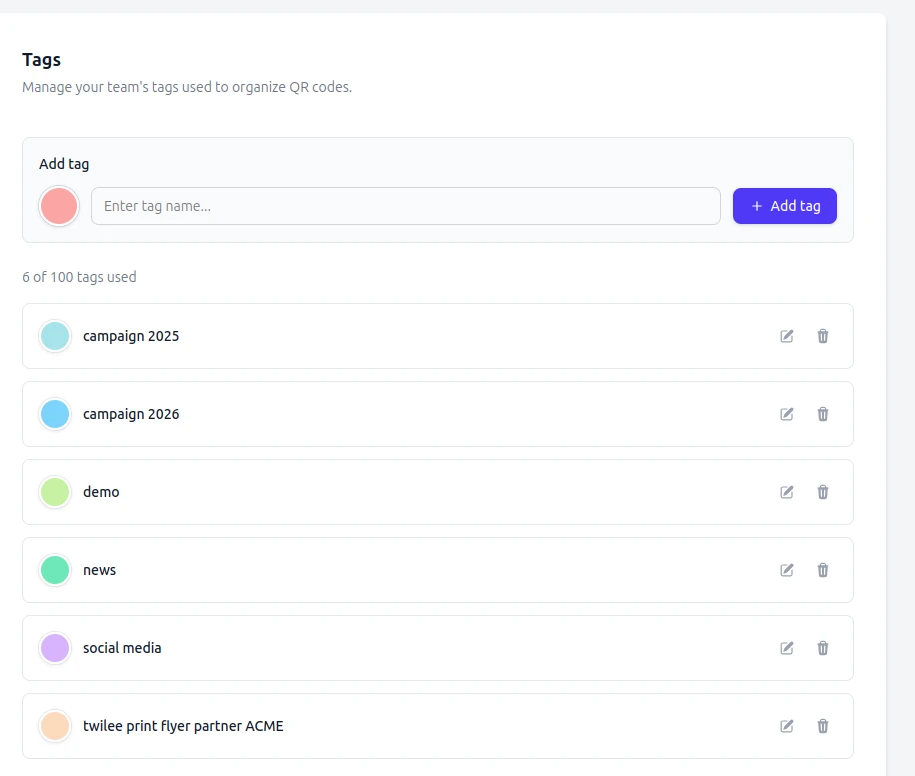
Create and manage custom tags from your team settings. Assign colors to visually distinguish different categories and keep your QR codes organized.
- Create up to 100 custom tags
- Assign colors for visual organization
- Edit or delete tags anytime
Apply Tags to QR Codes
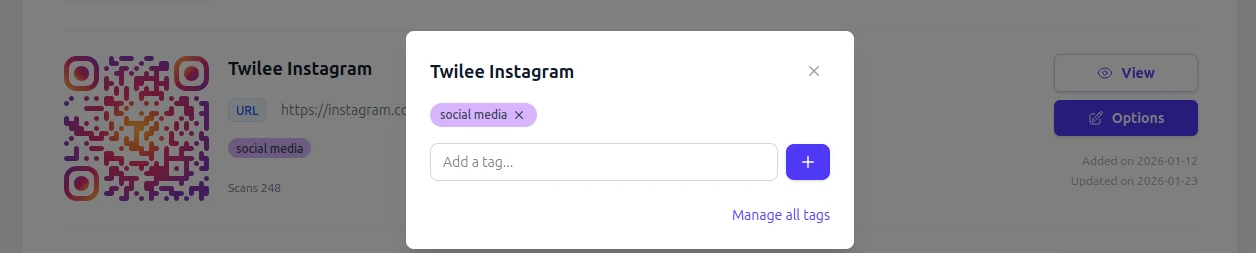
Easily assign one or multiple tags to any QR code. Tags are visible in your QR code list and can be used for filtering and bulk operations.
- Apply multiple tags to a single QR code
- Quick tag assignment from the list or detail view
- Tags persist across all operations
Enable Bulk Operations
Tags unlock powerful bulk operations. Select QR codes by tag to apply visual customizations or export images for an entire campaign at once.
Bulk Visual Customization
Apply consistent branding to all QR codes with the same tag.
Bulk Image Export
Download all QR code images for a specific tag as a ZIP file.
Quick Filtering
Instantly find QR codes by tag in your dashboard.
How it works
- Create your tags
- Set up tags in your team settings with custom names and colors that match your organization.
- Assign to QR codes
- Apply tags to your QR codes during creation or edit them later from your dashboard.
- Filter and operate
- Use tags to filter your QR codes and perform bulk operations on entire groups at once.
Tagging strategies
By campaign
Create tags like 'Summer Sale 2025', 'Product Launch', or 'Trade Show' to group QR codes by marketing campaign.
By location
Use tags like 'Store NYC', 'Office London', or 'Warehouse' to organize QR codes by physical location.
By product line
Tag QR codes with product categories like 'Electronics', 'Furniture', or 'Accessories' for easy management.
By client
Agencies can use client names as tags to separate QR codes and manage multiple accounts efficiently.
Ready to get organized?
Start using tags to streamline your QR code management.
Get started for freeWhy tags matter once you pass a dozen codes
A handful of QR codes is easy to eyeball in a list. A few hundred, spread across campaigns, locations and clients, is not. Tags are the layer that keeps that manageable: each code can carry several, each tag has a color, and the listing filters on them instantly.
The payoff is not just tidiness, it is that tags become the selection mechanism for everything else. Filter to a tag and you can apply a visual style across that whole set, export print-ready images for it, or read analytics for the group rather than code by code. In practice tags turn a flat list into the campaigns and clients you actually think in.
Related features
Bulk operations
Act on a tagged selection at once: restyle it, export it, or import a new batch into it.
Scan tracking and analytics
Read performance for a tagged group instead of one code at a time.
Team collaboration
Everyone in the workspace sees the same tags, so the organisation survives handovers.
Frequently asked questions
Common questions about QR code tags and organization.
What are tags and how do they work? ▼
Tags are custom labels you create to categorize your QR codes. Each tag has a name and a color. You can assign one or multiple tags to any QR code, then use those tags to filter your list or perform bulk operations on a group.
How many tags can I create? ▼
You can create up to 100 tags per team. Each tag can be assigned to an unlimited number of QR codes.
Can I use tags with bulk operations? ▼
Yes. Tags are the primary way to select QR codes for bulk visual customization and bulk image export. Select a tag, and the operation applies to every QR code with that tag.
Can I rename or delete a tag? ▼
Yes. Tags can be renamed, recolored, or deleted from your team settings at any time. Deleting a tag removes it from all associated QR codes but does not delete the QR codes themselves.